

Supernormal vs. Tucan.ai: Which AI tool generates better meeting notes?
What is Supernormal?
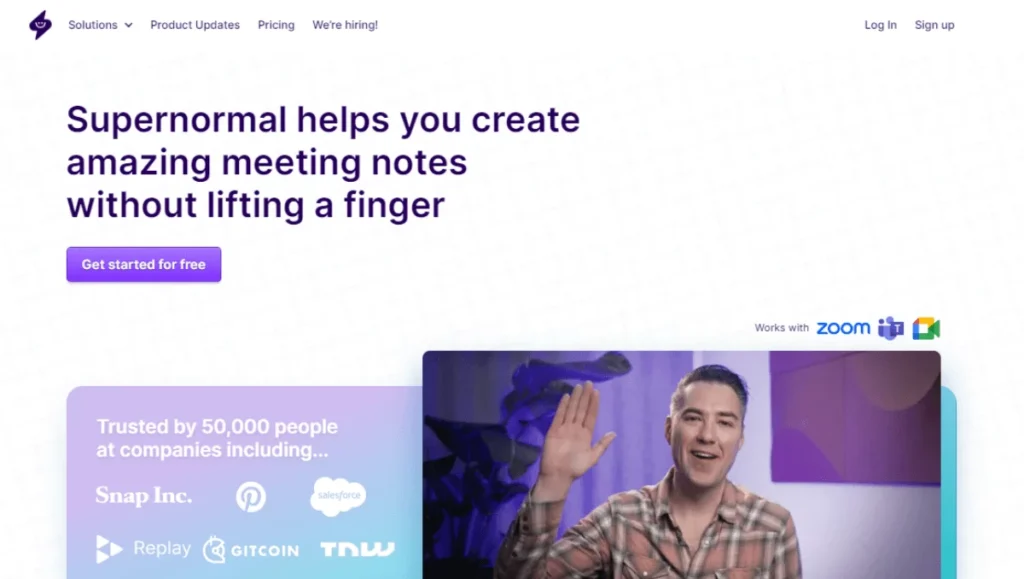
Supernormal is an AI-based platform that automates the process of creating meeting notes. It transcribes meetings and creates notes quickly and accurately, saving time and effort.
Notes can be shared instantly on various platforms such as Google Drive, Notion, Quip, Slack, Hubspot and Salesforce. The platform can also record videos of meetings. It supports multilingual transcriptions and offers unlimited length recordings. Users can edit and highlight key points, annotate, and share shots or highlights with a link.
Is there an alternative for Supernormal?
Tucan.ai is the optimal Supernormal alternative - especially when it comes to customized enterprise solutions, Tucan.ai offers advantages.
Overview
 |
 |
|
|---|---|---|
| Zoom integration | Yes | Yes |
| Microsoft Teams integration | Yes | Yes |
| Google Meet integration | Yes | Yes |
| Import pre-recorded audio/video files | Yes | Yes |
| Meeting transcripts | Yes | Yes |
| Automatic speaker recognition | Yes | Yes |
| Search meeting archive with keyword | Yes | Yes |
| Customized meeting notes according to meeting type | Yes | Yes |
| Languages | English, German, Spanish, French | Englisch, Französisch, Deutsch, Spanisch und mehr |
| Data processing location | Germany | N/A |
| On-premise solution | Optional for enterprise customers | N/A |
| Access and permissions | Yes | Yes |
Status: June 2023
Outsmart your competition!
Tucan.ai helps you analyze and manage your interviews, conversations and meetings by automatically transcribing, organizing and summarizing the data.
Meeting summaries comparison
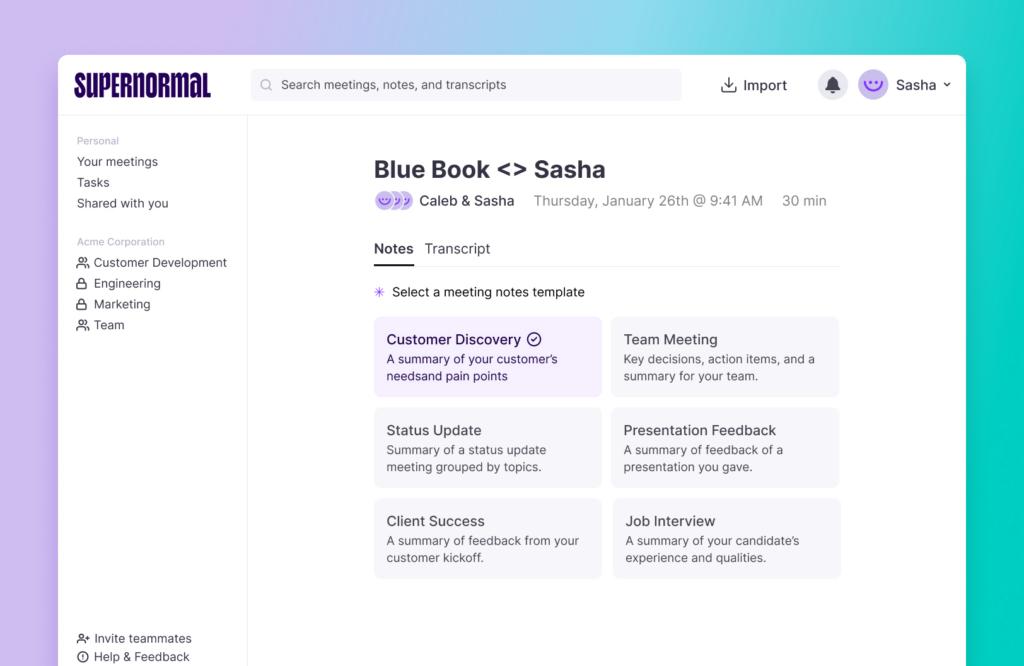
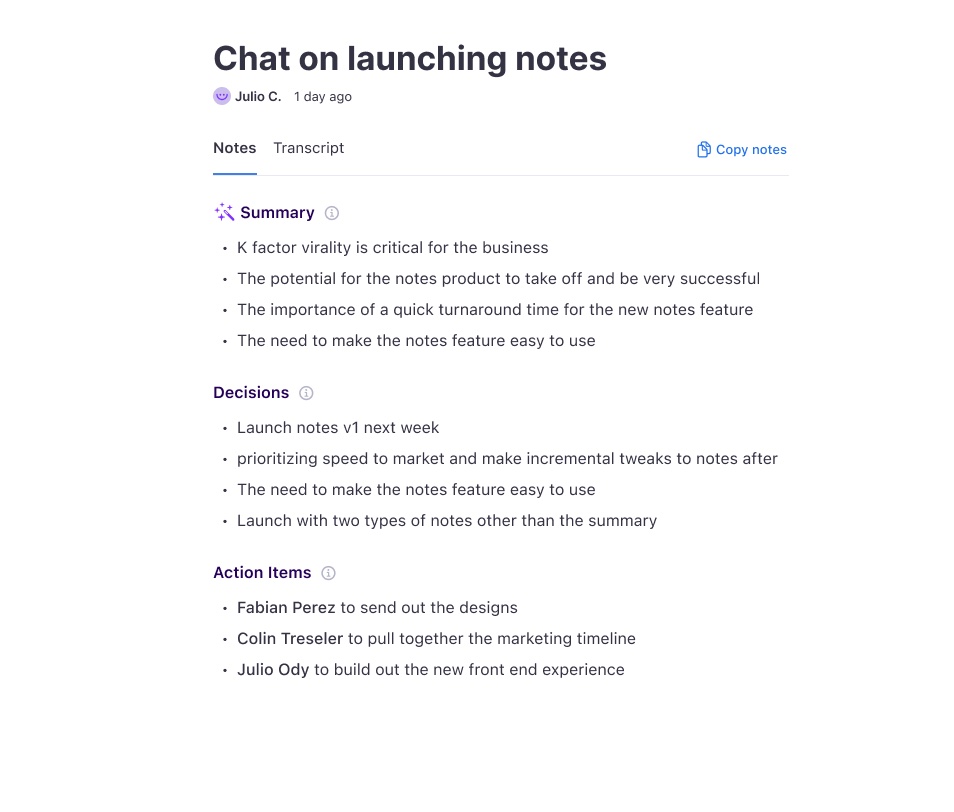
Supernormal's summaries are based on meeting templates. This way, the most important points can be summarized well and clearly in stick points, depending on the meeting type.
Simple summaries can easily be created with Tucan.ai. However, enterprise customers can also access complex user-defined meeting summaries. With Tucan.ai one or more custom instructions can be used to pull out various information depending on the meeting type.
Summaries in keywords or complete sentences, the next to-dos, the mood in the meeting and much more can be queried. However, these things can also be queried only for specific information resulting from the meeting. There are no limits for the user here.
Meeting summary in Tucan.ai:
Meeting summary in Supernormal:
Looking for an enterprise solution?
Whether custom data model training, custom workflow integrations, cloud or on-premise, or advanced security features, anything is possible with Tucan.ai. Tailor your package to your needs together with your personal customer advisor.
Book a free consultation call!

Trint vs Tucan.ai: Which transcription tool does it better?
Want to test Tucan.ai for free?
Trint offers automatic and transcription and subtitling software.
On the other hand, alongside transcription and subtitling software, Tucan.ai uniquely offers artificially intelligent meeting summarisation software.
For ordinary users who want to transcribe audio files or add subtitles to videos automatically, Trint is a great choice. For power users or professional users who want to improve the efficiency and impact of their meetings with accurate, AI-powered transcriptions, subtitles, and meeting summaries, Tucan.ai is the best bet.
In this article, we’re going to compare Trint and Tucan.ai. Keep reading to discover an overview of their main features, an outline of their pricing, a side-by-side analysis of each tool, and details on how easy it is to work with their respective teams.
Let’s dive in.
|
 |
|
|---|---|---|
| Accuracy | 99% | 99.5% |
| Summarisation | Has the ability to summarise audio recordings from meetings, providing action items and takeaways. | Their transcription tool doesn’t summarise results. |
| Export formats | Plain text file (.txt), Microsoft Word (.docx), SubRip (.srt), Open Document Text (.odt), Portable Document Format (.pdf) | Avid DS Subtitles (.txt), Microsoft Word (.docx), SubRip (.srt), VTT (.vtt), Spruce STL Subtitles (.stl), CSV (.csv) |
| Sentiment analysis | Can detect the emotions of speakers with a high level of accuracy. | Does not identify the sentiment of speakers. |
| Correcting errors | Streamlined correction using AI to detect highly accurate transcriptions versus those that need a second look. | Has the ability to correct mistakes but doesn’t highlight the errors quickly. |
| Multiple users | Unlimited users per account at no extra charge. | You are paying on a per-user basis. |
| On-premise functionality | On-premise solutions are available for enterprise customers. | n/a |
| Integrations | Integrates with Zoom, MS Teams and Google Meet and has the ability to customise for enterprise customers. | Integrates with Adobe® Premiere® Pro, Zoom, and Zapier. |
| API access | Tucan.ai provides API access and the following features: multi-language support in (German, English, Spanish, and French), dual-channel audio, speaker labelling, summarisation, automatic punctuation, timestamps, sentiment analysis and various audio and video formats. | Can upload and transcribe audio using their API into 35 languages. Supports speaker labels, case formatting, timestamps, and a range of audio/video formats. |
| Privacy | Stores data in AWS data centres in Germany. | Stores data in AWS data centres in the US. |
Auf der Suche nach einer Enterprise Lösung?
Ob benutzerdefiniertes Datenmodell-Trainings, kundenspezifische Workflow-Integrationen, Cloud oder On-Premise, oder erweiterte Sicherheitsfunktionen, mit Tucan.ai ist alles möglich. Schneiden Sie Ihr Paket gemeinsam mit Ihrem persönlichen Kundenberater auf Ihre Bedürfnisse zu.
Jetzt anfragen
Transcription quality
In order to evaluate the performance of Trint and Tucan.ai transcription tools, we have uploaded video interviews featuring Christoph Waltz discussing his career and role in James Bond's Spectre. These videos have been selected as they feature Waltz speaking in both English and German, providing a consistent basis for testing the transcription tools in both languages.
- German: Spectre | Christoph Waltz im Bond-Bösewicht Interview + GEWINNSPIEL
- English: Christoph Waltz Talks Candidly About His Successful Career | This Morning
Word Error Rate
Prior to comparing the two tools, it is important to note the significance of Word Error Rate (WER), which is a widely-used metric for evaluating the accuracy of speech recognition and automatic transcription tools. Essentially, WER is the measure of the ratio of errors in a transcript to the total words spoken, with a lower percentage indicating better performance of the tool.
To be considered a good transcription tool, Microsoft asserts that they need a word error rate as low as 5-10%. Anything over 20% is poor.
Trint doesn’t publicly share what their WER is, but third party studies show that they were 87% accurate across several different recordings. That’s a WER of 13%.
With that in mind, if you’re using Trint, you’ll want a higher-quality microphone to make sure audio is clear.
In contrast, Tucan.ai’s speech recognition software offers an accuracy rate of 90%.
Testing audio uploads
Trint
Let’s test the two Christopher Waltz interviews using Trint.
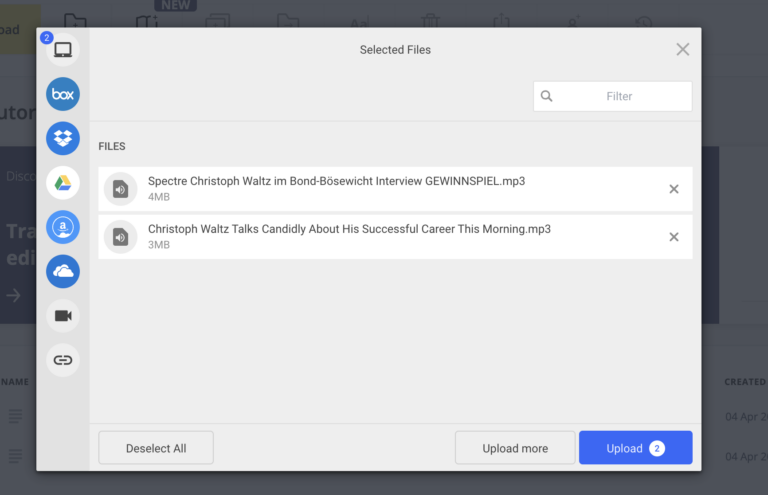
In Trint’s free trial you can upload three files. Their next tier is their starter plan which offers seven files per user per month.
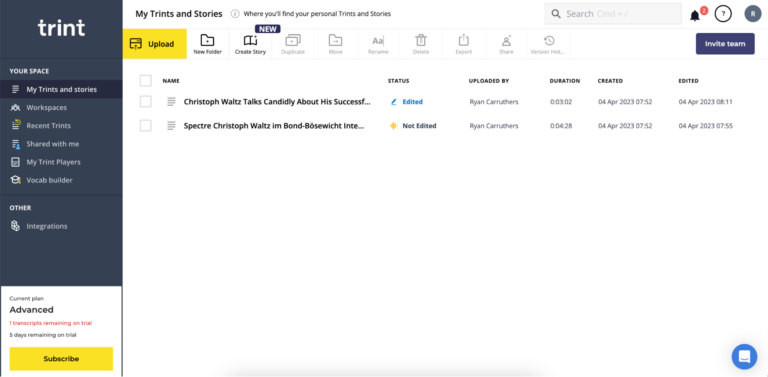
Uploading took a few seconds, but processed for a couple of minutes. In total, it was 3-4 minutes. An automatic email notification was sent when they were ready.
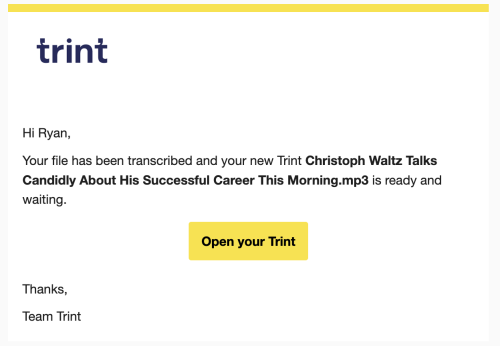
When you open the editor for the first time, a quick tour highlights the helpful features and shortcuts that make editing the transcript faster.
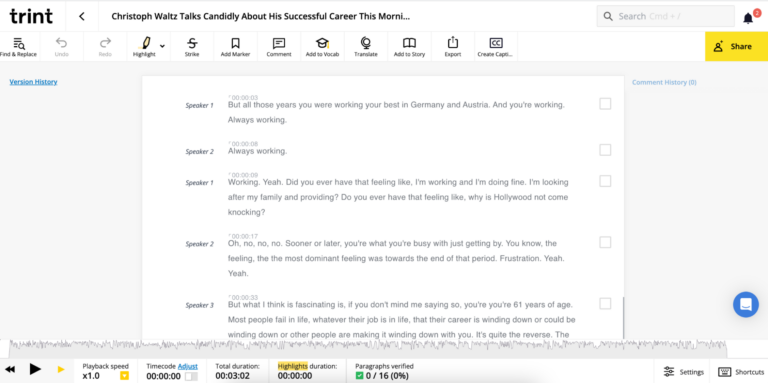
In the English version of Waltz’s interview, of the 435 words spoken, none were incorrect. That said, it did struggle with transcribing when words were spoken over one another. Corrections were needed in the two instances where this happened. Similar results were seen for the German interview as well.
Tucan.ai
Tucan.ai's user-friendly interface allows you to upload one audio file at a time with ease.
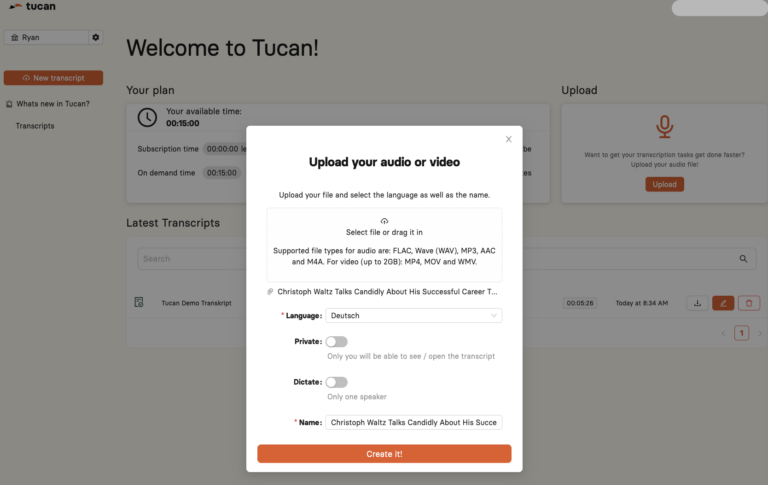
After the transcription process, which took approximately two minutes, it was time to proceed to the editor to check the Word Error Rate (WER). Trint doesn’t highlight the WER, so this had to be done manually. But Tucan.ai is more transparent. It automatically calculates the WER and provides a table of transcribed words that require attention.
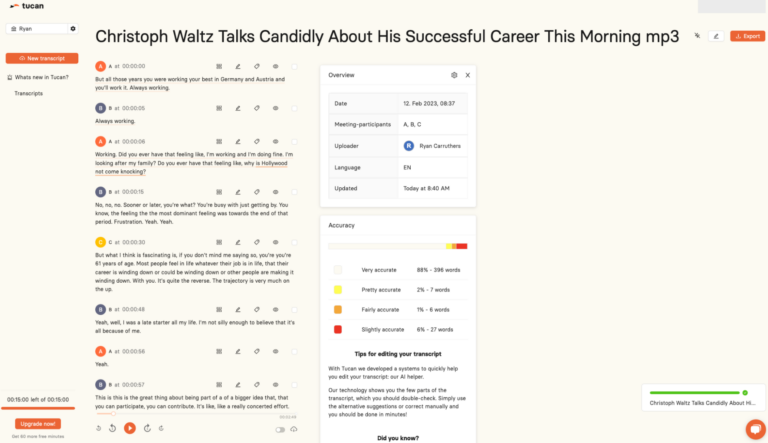
Overall, in the English export of 435 words, 5 of them were incorrect. This gave it a slightly higher WER at 1%.
One significant point to make on the editing process is that Tucan.ai made it clear what needed to be corrected. A separate table highlights accuracy issues.
Trint doesn’t have this, so catching issues requires manually listening to the audio and comparing it to the transcript, after which corrections can manually be made.
Below, we’ll outline a variety of core features in more detail.
Want to test Tucan.ai for free?
Features
To ensure that you are investing in a transcription tool that is right for you, there are several features to consider. In the following sections, we will outline the seven essential features to look for when evaluating a transcription tool.
Summarisation
Trint: Their transcription tool doesn’t summarise results.
Tucan.ai offers a feature to summarise audio recordings of meetings, which includes action items and key takeaways.
Tucan.ai's transcription tool includes a valuable feature for automatic summarisation of meeting recordings. This AI-powered tool helps users quickly identify the key points and takeaways from a meeting without the need to manually sift through lengthy transcripts. With Tucan.ai's summarisation feature, users can efficiently obtain a high-level overview of the meeting, saving time and enabling them to focus on the most relevant information.
Export formats
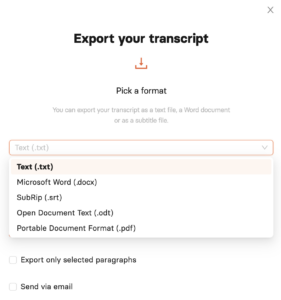
Trint: Avid DS Subtitles (.txt), Microsoft Word (.docx), SubRip (.srt), VTT (.vtt), Spruce STL Subtitles (.stl), CSV (.csv)
Tucan.ai: Plain text file (.txt), Microsoft Word (.docx), SubRip (.srt), Open Document Text (.odt), Portable Document Format (.pdf)
Exporting transcripts in various file formats is another essential feature of transcription software. Without it, sharing transcripts is unnecessarily harder. While both tools provide standard export formats, they differ in their support for more specialized file formats.
Sentiment analysis
Trint: Does not identify the sentiment of speakers.
Tucan.ai: Has the capability to accurately detect the emotions of speakers.
Sentiment analysis involves an AI tool that categorizes the text in a transcript or written document as positive, negative, or neutral, using algorithms to identify emotions like happiness and anger.
This feature makes it much easier to review meeting notes with team members or share notes with absentees. By quickly analyzing the sentiment, the tool provides insight into how the conversation went. Even if you were present during the meeting, an AI sentiment analysis tool such as Tucan.ai can identify emotions that you might have missed.
Correcting errors
Trint: Has the ability to correct mistakes but doesn’t highlight the errors clearly.
Tucan.ai: Tucan.ai provides a unique feature called the AI helper.
It uses AI to quickly check areas of the transcription to review and double-check for 100% accuracy. Once you open your editor, the AI helper will highlight a few parts of the transcript that require a second look, and suggest alternative corrections for you to choose from or manually edit. This feature allows for a streamlined correction process and ensures the accuracy of the transcript.
Multi-user accounts
Trint: Up to 3 users on their start plan and 15 on their advanced plan.
Tucan.ai: Unlimited users.
Efficiently share information with your team by transcribing and summarising meetings. The more team members with access to the tool, the more value it provides. Tucan.ai's Transcription Pro plan allows unlimited user access without additional charges.
On-premise functionality
Trint: Does not offer on-premise solutions.
Tucan.ai: Offers on-premise solutions to enterprise customers.
Tucan.ai has its own AI engine and can be installed on-premise to provide additional security for enterprise clients that require it.
Integrations
Trint: Integrates with Adobe® Premiere® Pro, Zoom, and Zapier.
Tucan.ai: Tucan.ai integrates with video conferencing platforms like Zoom, MS Teams, and Google Meet. Additionally, it offers enterprise clients the option to customize the tool to meet their specific needs.
Tucan.ai integrates with widely-used content, collaboration, task, conference and customer management systems, such as Zoom, MS Teams and Google Meet. With this integration, Tucan.ai can transcribe and summarise meetings for greater efficiency and productivity.
API access
Trint: Can upload and transcribe audio using their API into 35 languages. Supports speaker labels, case formatting, timestamps, and a range of audio/video formats.
Tucan.ai: Provides API access as well as the following features: multi-language support (German, English, Spanish, and French), dual-channel audio, speaker labelling, summarisation, automatic punctuation, timestamps, sentiment analysis and various audio and video formats.
Tucan.ai’s flexible API enables any workplace to integrate Tucan.ai’s transcription and summarisation tools into their workflows.
Editor
Tucan.ai's editor has a user-friendly interface that presents more information than Trint. The overview table displays the date, owner, language, and number of speakers in the uploaded file.
The report below the overview table is the accuracy table. Unique to Tucan.ai, the AI has a high accuracy rate even when speakers have a strong dialect and accent.
Likewise, the tool highlights what words need a second look for 100% accuracy. The accuracy report lists which words are ‘very accurate’ down to ‘slightly accurate’ and ‘needs review’.
This makes correcting the transcript much faster than Trint, which is manual.
Within Trint’s editor, most functions run along the top bar. This is different from Tucan.ai which displays it on the right-hand side. Along the bottom, Trint shows the audio file with a straightforward UI to pause or scrub along the timeline.
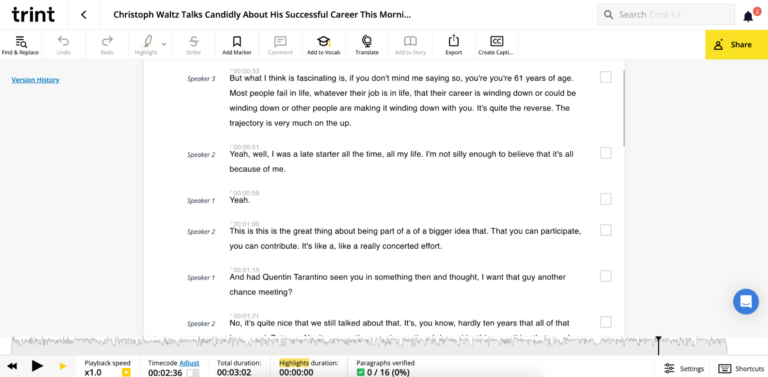
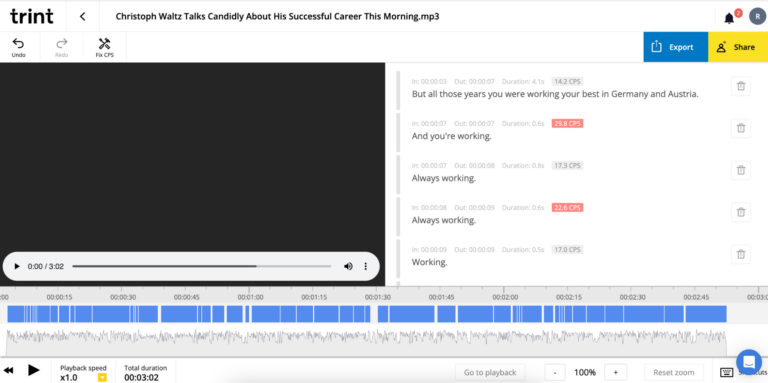
Trint does offer a caption-making tool for video uploads. This is a different editor for those who want to edit the video as well as the transcript.
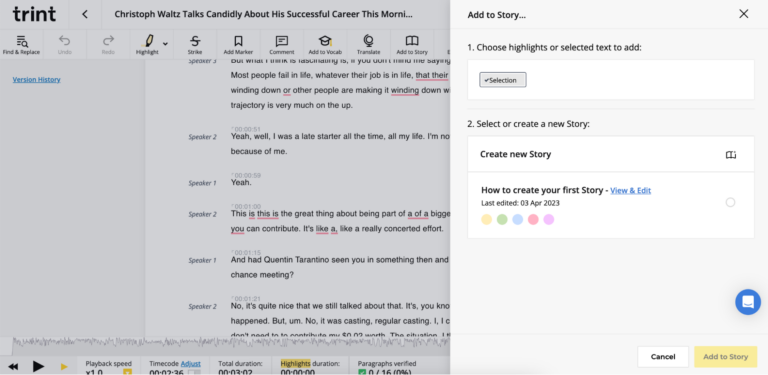
Back within the transcript editor, you have the option to highlight text from multiple transcripts and compile them in yet another editor, called “Stories.” Stories let you combine clips from multiple transcripts.
While editing your transcript on Tucan.ai, you can utilize their "streamline correction" feature, which helps you quickly identify sections that need a second look.
However, it's worth noting that during the correction, the tool occasionally flagged parts where speakers were talking simultaneously, leading to mixed results.
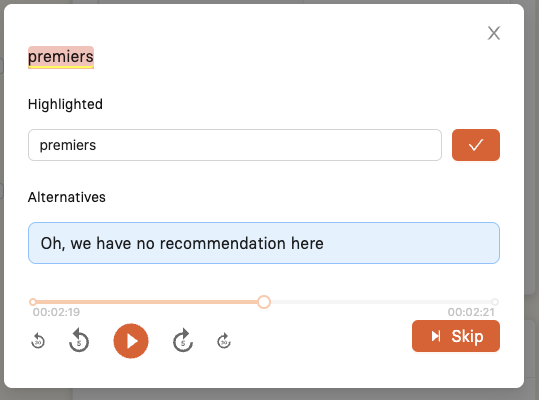
However, it was easy to find the correct speaker and word by playing the audio for a second or two.
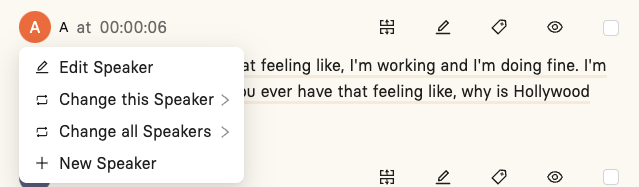
Additionally, a helpful feature of Tucan.ai is that it tags the speakers, labelling them as A, B, C, and so on. This is helpful as it makes it easy to see who’s talking. Likewise, if you need to edit the speaker, it’s easy.
Want to test Tucan.ai for free?
Data Privacy
Trint's privacy policy summarised
Trint has two separate policies for privacy: one for their website and marketing, and one for their transcription platform. The policies outline how personal data is processed, with Trint being the data controller. They may collect personal information such as IP addresses, usage data, and personal information (such as name and email address) for the purpose of improving their website, registering customers, performing contracts, and engaging in direct marketing activities. Third parties may be involved in processing this data, and it may be stored or processed outside of the European Economic Area. Data is stored for specific periods of time, and individuals have the right to unsubscribe from marketing communications.
Tucan.ai's privacy policy summarised
Tucan.ai uses servers from Amazon Web Services (AWS) to store, host and maintain users’ personal data. AWS servers are located in Frankfurt, Germany. Data will be processed exclusively in Europe via AWS for the purpose of storing, hosting or storing users’ personal data and will not be transferred to any AWS web server in a non-European country.
Support
Tucan.ai's team is readily available to provide support, answer inquiries, and assist you in maximizing the potential of their platform. You can easily reach a member of the Tucan.ai team through the chatbot located in the bottom right corner of the app.
Additionally, you can contact Tucan.ai by phone, email, or their office. The team appreciates feedback of all kinds, as their aim is to continuously improve their platform based on the real needs of their users.

Conclusion
It's crucial to consider your specific needs when choosing a transcription tool. Are you simply seeking a fast transcript for a meeting or interview? Or are you seeking a solution that seamlessly integrates with your workflow and enhances the accessibility and usefulness of your meetings?
If you're in search of a reliable meeting recording and transcription tool that streamlines your workflow and facilitates quicker access to valuable information for your team, consider giving Tucan.ai a try.
Eliminate the burden of manual transcription and note-taking and prioritize productive meetings with Tucan.ai. Their advanced speech recognition AI simplifies documentation during conversations, meetings, and interviews by summarising key discussion points.
It continually improves with use, is compatible with popular communication tools and is easily adaptable for any organization. Whether you need to transcribe a recent meeting, share notes across your company, or develop a customized solution, Tucan.ai optimizes your meeting experience.
Learn more about how Tucan.ai can makes your meetings better.
Auf der Suche nach einer Enterprise Lösung?
Ob benutzerdefiniertes Datenmodell-Trainings, kundenspezifische Workflow-Integrationen, Cloud oder On-Premise, oder erweiterte Sicherheitsfunktionen, mit Tucan.ai ist alles möglich. Schneiden Sie Ihr Paket gemeinsam mit Ihrem persönlichen Kundenberater auf Ihre Bedürfnisse zu.
Jetzt anfragen
Amberscript vs Tucan.ai: Which transcription tool does it better?
Amberscript offers software for transcription and subtitling with an option for manual instead.
Conversely, Tucan.ai offers transcription, subtitling, and, uniquely, artificially intelligent meeting summarisation software.
For regular users who want to regularly transcribe audio files or add subtitles to videos automatically, but also have the option to have them done manually, Amberscript offers those services. For professional users who want to make meetings more efficient and impactful with accurate transcriptions, subtitles, and meeting summaries powered by AI, Tucan.ai is the leading tool.
In this article, we’re going to compare Amberscript and Tucan.ai. We’ll provide an overview of their main features, outline their pricing, analyse each tool in context, and detail how easy it is to work with their team.
Let’s dive in.
Overview
|
 |
|
|---|---|---|
| Accuracy | 90% | 85% |
| Summarisation | Has the ability to summarise audio recordings from meetings, providing action items and takeaways. | Their transcription tool doesn’t summarise results. |
| Export formats | Plain text file (.txt), Microsoft Word (.docx), SubRip (.srt), Open Document Text (.odt), Portable Document Format (.pdf) | Plain text file (.txt), Microsoft Word (.docx), SubRip (.srt), JavaScript Object Notation (.json), Web Video Text Tracks (.vtt), European Broadcast Union subtitles (EBU-STL) |
| Sentiment analysis | Can detect the emotions of speakers with a high level of accuracy. | Does not identify the sentiment of speakers. |
| Correcting errors | Streamlined correction using AI to detect highly accurate transcriptions versus those that need a second look. | Has the ability to correct mistakes but doesn’t highlight the errors quickly. |
| Multiple users | Unlimited users. | Multi-user license available for enterprise customers. |
| On-premise functionality | On-premise solutions are available for enterprise customers. | Has an on-premise service for customised high-volume cases. |
| Integrations | Integrates with Zoom, MS Teams and Google Meet and has the ability to customise for enterprise customers. | Supports integration with video management systems like Kaltura, Opencast, Panopto, Company Webcast, and more. |
| API access | Tucan.ai provides API access and the following features: multi-language support in (German, English, Spanish, and French), dual-channel audio, speaker labelling, summarisation, automatic punctuation, timestamps, sentiment analysis and various audio and video formats. | API is available in 80+ languages. Supports dual-channel audio, speaker labels, automatic punctuation and case formatting, timestamps, and a range of audio/video formats. |
Auf der Suche nach einer Enterprise Lösung?
Ob benutzerdefiniertes Datenmodell-Trainings, kundenspezifische Workflow-Integrationen, Cloud oder On-Premise, oder erweiterte Sicherheitsfunktionen, mit Tucan.ai ist alles möglich. Schneiden Sie Ihr Paket gemeinsam mit Ihrem persönlichen Kundenberater auf Ihre Bedürfnisse zu.
Jetzt anfragen
Transcription quality
To compare the quality of Amberscript’s and Tucan.ai’s transcription tools, we uploaded the following video interviews of Christoph Waltz discussing his role in James Bond’s Spectre and other parts of his career. We chose these videos because Waltz interviews in both German and English, giving us an opportunity to test both tools in the two languages with the same person’s voice as a control.
- German: Spectre | Christoph Waltz im Bond-Bösewicht Interview + GEWINNSPIEL
- English: Christoph Waltz Talks Candidly About His Successful Career | This Morning
Word Error Rate
Before we compare the two tools, it’s worth mentioning Word Error Rate (WER), the common metric that’s used to test the validity of a speech recognition or automatic transcription tool. WER is simply “the ratio of errors in a transcript to the total words spoken.” The lower the percentage, the better the tool.
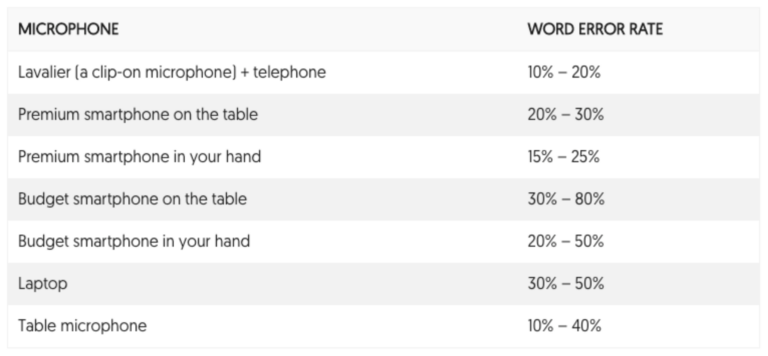
Amberscript shares how its WER changes with different microphones. They boast a WER of as low as 10%, which is considered good but can go up to 40-80% if it has poor audio quality. In essence, if you’re using Amberscript, you’ll want a high-quality microphone.
Amberscript's transcription tool boasts an accuracy rate of 85%, while Tucan.ai's speech recognition software offers 90%.
Testing audio uploads
Amberscript
Now to test the two Christopher Waltz interviews. Using Amberscript, you can upload both files.
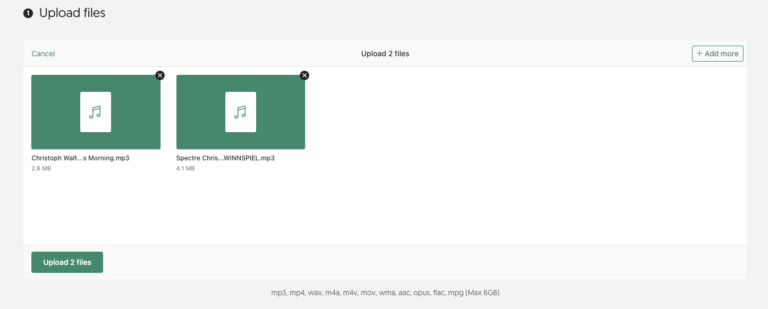
When you upload the files, Amberscript clarifies that their accuracy is 85% making their WER 15%. This isn’t the recommended quality of 10%, but it’s still acceptable.
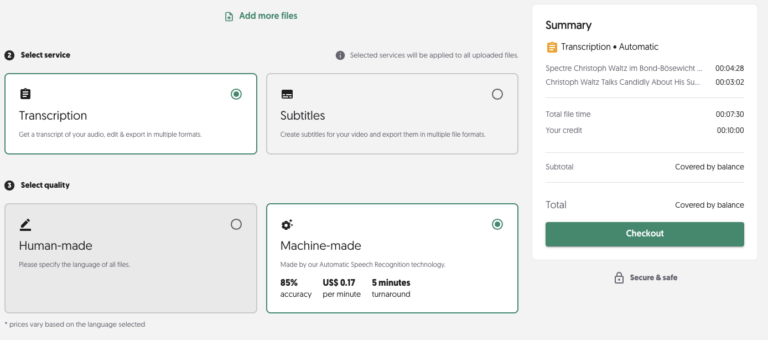
Likewise, Amberscript limits you to only 10 minutes of free audio uploading. Beyond that, it’s €20 per hour.
After uploading the file, it took about 1-2 minutes for both of them to complete. It was pretty fast.
The editor opens for the first time with a quick tour that highlights the helpful features and shortcuts that makes editing the transcript faster.
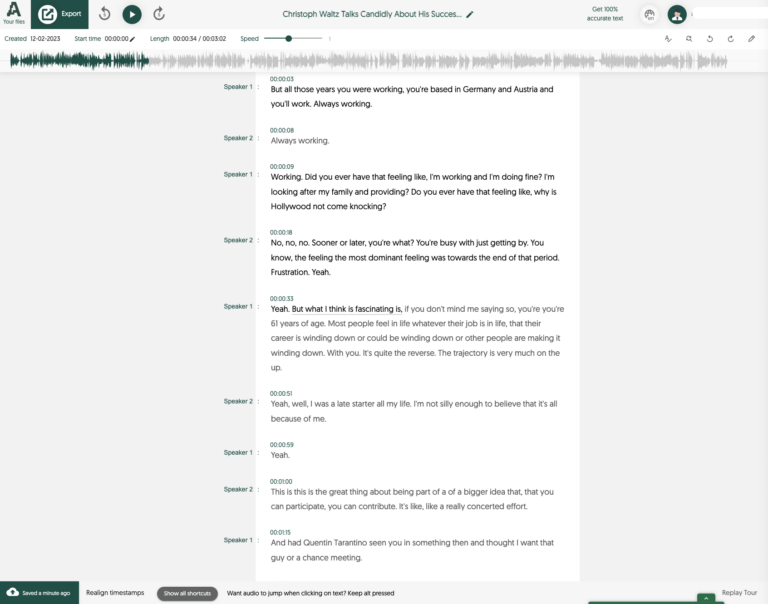
In the English export, of the 435 words spoken, 3 of them were incorrect. Therefore, the WER was 0.7%. That’s quite good. Similar results were seen for the German interview as well.
Tucan.ai
Using Tucan.ai, you can upload one audio file at a time with a straightforward UI.
The transcription took about 2 minutes. Once it was done, it was time to progress to the editor to see the WER. Whereas the WER in Amberscript had to be manually calculated, Tucan.ai is both more efficient and transparent; the WER is automatically calculated and they also include a table with transcribed words that are very accurate or need a second look.
Overall, in the English export of 435 words, 5 of them were incorrect. This gave it a slightly higher WER than Amberscript, at 1% vs 0.7%.
The one difference, however, was how easy it was to spot the errors. By highlighting them in a separate table, Tucan.ai made it a lot easier to correct. In Amberscript, correcting the word involved re-listening to the audio, actively noticing the mistake between the audio and what was transcribed, and manually altering the output.
Below, we’ll outline a variety of core features in more detail.
Want to test Tucan.ai for free?
Features
When choosing a transcription tool, there are a few features to look for to make sure you’re getting your money's worth, and it has what you need. We’ll detail the seven core features below.
Summarisation
Amberscript: Their transcription tool doesn’t summarise results.
Tucan.ai: Has the ability to summarise audio recordings from meetings, providing action items and takeaways.
Summarisation is an important feature of Tucan.ai’s transcription tool. Summarising your meetings automatically using Tucan.ai’s AI-powered tool helps you quickly see the most important points and takeaways from a meeting. It’s inefficient to manually go through long transcripts and identify what is truly important. By summarising the content with Tucan.ai, you can quickly get a high-level overview of the meeting, which can save them time and help them focus on what's most relevant.
Export formats
Amberscript: Plain text file (.txt), Microsoft Word (.docx), SubRip (.srt), JavaScript Object Notation (.json), Web Video Text Tracks (.vtt), European Broadcast Union subtitles (EBU-STL)
Tucan.ai: Plain text file (.txt), Microsoft Word (.docx), SubRip (.srt), Open Document Text (.odt), Portable Document Format (.pdf)
Another core transcription software feature is the possibility to export the transcript in multiple file formats. The exporting feature makes it easy to send the transcript to whoever needs it in whatever file format you’d like it.
Both tools offer the most common export formats but differ in the more niche ones.
Sentiment analysis
Amberscript: Does not identify the sentiment of speakers.
Tucan.ai: Can detect the emotions of speakers with a high level of accuracy.
Sentiment analysis is when an AI tool classifies whether the text in a transcript or written document is positive, negative or neutral. Using algorithms, it identifies emotions such as joy and anger within what’s said.
This is immensely beneficial when looking back at meetings you’ve had with team members or you’re sharing your meeting notes with others who didn’t attend. Sentiment analysis can quickly reveal how the conversation went. Additionally, even if you were present at the meeting, an AI sentiment analysis tool, like Tucan.ai, can reveal emotions that you missed.
Correcting errors
Amberscript: Has the ability to correct mistakes but doesn’t highlight the errors quickly.
Tucan.ai: Streamlined correction using AI to detect highly accurate transcriptions versus those that need a second look.
A unique feature of Tucan.ai’s transcription tool is the AI helper. Within your editor, the AI helper shows you a few parts of the transcript that you should double-check. Simply use the alternative suggestions or correct them manually. It’s an incredibly fast way to make sure the transcript is accurate.
Multi-user accounts
Amberscript: Multiple users.
Tucan.ai: Unlimited users.
Transcribing and summarising meetings is a powerful way to disseminate information throughout your team efficiently. For that reason, the more people who can use the tool, the more value it delivers. Within Tucan.ai’s Transcription Pro plan, you can have unlimited user access without extra costs.
On-premise functionality
Amberscript: Has an on-premise service for customised high-volume cases.
Tucan.ai: On-premise solutions are available for enterprise customers.
Tucan.ai operates its own AI engine and can also be installed on-premise for enterprise clients if special protection is required.
Integrations
Amberscript: Supports integration with video management systems like Kaltura, Opencast, Panopto, Company Webcast, and more
Tucan.ai: Integrates with Zoom, MS Teams and Google Meet and has the ability to customise for enterprise customers.
Tucan.ai integrates with common content, collaboration, task, conference and customer management systems, including Zoom, MS Teams and Google Meet, to transcribe and summarise meetings.
API access
Amberscript: API is available in more than 80 languages. They support dual-channel audio, automatic punctuation and casing, speaker labels, timestamps, and all common audio/video file formats.
Tucan.ai: Provides API access and the following features: multi-language support in (German, English, Spanish, and French), dual-channel audio, speaker labelling, summarisation, automatic punctuation, timestamps, sentiment analysis and various audio and video formats.
Tucan.ai’s flexible API enables any workplace to integrate its transcription and summarisation tools into their customers workflows.
Editor
Tucan.ai’s editor has an easy-to-understand UI. At first glance, Tucan.ai provides more information upfront than Amberscript. For starters, the overview table provides general information on the date, owner, and language of the upload, as well as identifies how many individual speakers are prese
The report below the overview table is the accuracy table. Unique to Tucan.ai, the AI has a high accuracy rate even when speakers have a strong dialect and accent. Likewise, they concretely identify which words need a second look. The accuracy report lists which words are ‘very accurate’ down to ‘slightly accurate’ and ‘needs review’.
This makes correcting the transcript much faster than Amberscript.
Within Amberscript’s editor, the details run along the top, rather than on the right-hand side like Tucan.ai’s editor. It shows the audio file above the transcript with a straightforward UI to pause and scrub along the timeline.
Sometimes, when editing a transcript, it’s easier to scan at 1.25 or 1.5x speed. Most users are familiar with the YouTube playback settings which offer different speeds. In Amberscript, it’s a slider which may feel odd when you first use it, but it’s a small feature.
Amberscript also offers a service where a real person will review your transcript to make sure it’s 100% accurate. This is a paid service, however, and will cost you €2.55 per minute.
As you edit your transcript, you can use their “streamline correction” feature, which makes it easy to spot the areas where you need to have a second look.
When correcting highlighted areas, the transcription occasionally highlighted when people were speaking over one another, which led to mixed results.
However, it was easy to find the correct speaker and word by playing the audio for a second or two.
Additionally, a unique feature of Tucan.ai is that it tags the speakers, labelling them as A, B, C, and so on. This is helpful as it makes it easy to see who’s talking. Likewise, if you need to edit the speaker, it’s easy.
Want to test Tucan.ai for free?
Data Privacy
Amberscript’s privacy policy summarised
Amberscript uses Amazon Web Services located in Frankfurt, Germany for their IT infrastructure, which stores and processes all data on highly secure servers with regular backups. Transcriptions in certain languages will never leave the EU, while other languages may use third-party providers for processing which may result in the data leaving European servers. However, all third-party providers are contractually obligated to delete the data immediately after processing.
Tucan.ai's privacy policy summarised
Tucan.ai uses servers from Amazon Web Services (AWS) to store, host and maintain users’ personal data. AWS servers are located in Frankfurt, Germany. Data will be processed exclusively in Europe via AWS for the purpose of storing, hosting or storing users’ personal data and will not be transferred to any AWS web server in a non-European country.
Support
Tucan.ai’s team is always on standby to offer support, answer questions, and help you get the most out of their platform. Within the app, you can reach a member of the Tucan.ai team at any time with the chatbot in the bottom right corner.
Likewise, Tucan.ai is easy to reach via phone, email, or our office. The team values feedback of all kinds, as their ongoing goal is to evolve their platform in alignment with their users’ real needs.
Conclusion
When you’re evaluating a transcription tool, it’s always important to consider your unique use case. Do you only need a quick transcript from a meeting or interview? Or do you need a tool that can integrate into your workflow and make your meetings more accessible and actionable?
If you’re looking for a powerful transcription and meeting recording tool that saves you time and helps your teams get the information they need faster, try Tucan.ai.
Put manual transcription and note-taking in the past and focus on having impactful meetings. Tucan.ai’s well-trained speech recognition AI takes over tedious documentation tasks during interviews, meetings and other conversations and summarises the key points of the discussion. It learns as you use it, integrates with the communication tools you use every day, and is scalable across your team.
Whether you want to transcribe the meeting you had today, roll out notes for a previous meeting to help your whole organisation, or create a custom solution for your enterprise, learn more about how Tucan.ai can make your meetings better.
Auf der Suche nach einer Enterprise Lösung?
Ob benutzerdefiniertes Datenmodell-Trainings, kundenspezifische Workflow-Integrationen, Cloud oder On-Premise, oder erweiterte Sicherheitsfunktionen, mit Tucan.ai ist alles möglich. Schneiden Sie Ihr Paket gemeinsam mit Ihrem persönlichen Kundenberater auf Ihre Bedürfnisse zu.
Jetzt anfragen
Fireflies.ai vs Tucan.ai: Which AI tool generates better meeting notes?
What is Fireflies.ai?
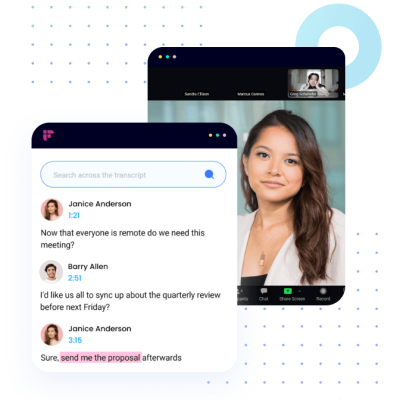
Fireflies.ai uses artificial intelligence (AI) to create automated meeting notes with transcription, audio recording and automatic meeting summaries.
The meeting tool from the USA comes with a variety of features. It can help companies, as well as individuals, to make internal as well as external meetings more productive and efficient. This can save them tremendous time (and money).
Is there an alternative for Fireflies.ai?
Tucan.ai is the ideal Fireflies.ai alternative – especially when it comes to customized enterprise solutions, Tucan.ai offers advantages.
Overview
|
 |
|
|---|---|---|
| Zoom integration | Yes | Yes |
| Microsoft Teams integration | Yes | Yes |
| Google Meet integration | Yes | Yes |
| Import pre-recorded audio/video files | Yes | Yes |
| Meeting transcripts | Yes | Yes |
| Automatic speaker recognition | Yes | Yes |
| Search meeting archive with keyword | Yes | Yes |
| Meeting summaries | Custom | Generic |
| Summaries across multiple meetings | Yes | No |
| ChatGPT-like" queries of the entire meeting archive | Yes | No |
| Languages | English, German, Spanish, French | English |
| Data processing location | Germany | USA |
| On-premise solution | Optional for enterprise customers | N/A |
| Access and permissions | Yes | Yes |
Status: April 2023
Outsmart your competition!
Tucan.ai helps you analyze and manage your interviews, conversations and meetings by automatically transcribing, organizing and summarizing the data.
Book a free consultation call!
Meeting summaries comparison
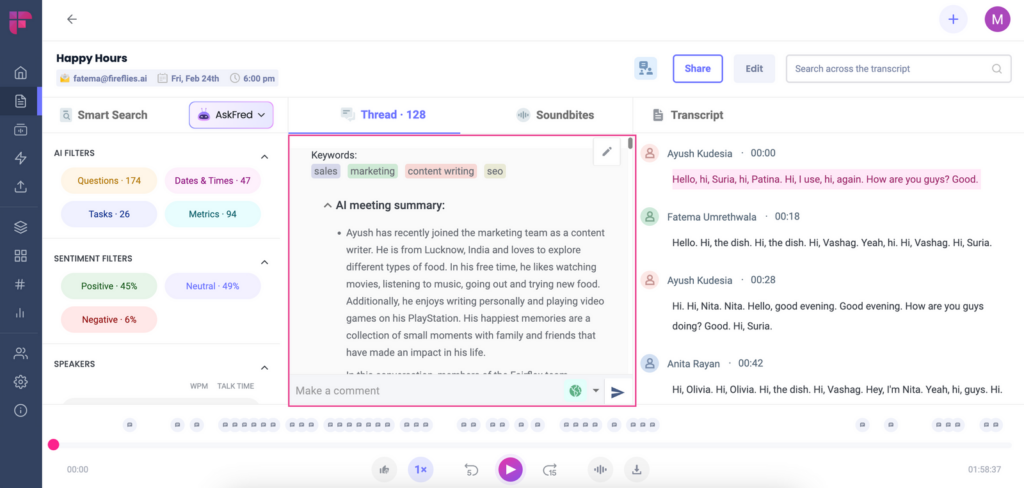
Fireflies.ai can automatically identify the most important keywords and provide an overview of the meeting in a few paragraphs, bullet point notes as well as to-dos.
Simple summaries can easily be created with Tucan.ai. However, enterprise customers can also access complex user-defined meeting summaries. With Tucan.ai one or more custom instructions can be used to pull out various information depending on the meeting type.
Summaries in keywords or complete sentences, the next to-dos, the mood in the meeting and much more can be queried. However, these things can also be queried only for specific information resulting from the meeting. There are no limits for the user here.
Meeting summary in Tucan.ai:
Meeting summary in Fireflies.ai:
Looking for an enterprise solution?
Whether custom data model training, custom workflow integrations, cloud or on-premise, or advanced security features, anything is possible with Tucan.ai. Tailor your package to your needs together with your personal customer advisor.
Amberscript vs Tucan.ai: Which transcription tool does it better?
Want to test Tucan.ai for free?
Amberscript offers software for transcription and subtitling with an option for manual instead.
Conversely, Tucan.ai offers transcription, subtitling, and, uniquely, artificially intelligent meeting summarisation software.
For regular users who want to regularly transcribe audio files or add subtitles to videos automatically, but also have the option to have them done manually, Amberscript offers those services. For professional users who want to make meetings more efficient and impactful with accurate transcriptions, subtitles, and meeting summaries powered by AI, Tucan.ai is the leading tool.
In this article, we’re going to compare Amberscript and Tucan.ai. We’ll provide an overview of their main features, outline their pricing, analyse each tool in context, and detail how easy it is to work with their team.
Let’s dive in.
Overview
|
|
|
|---|---|---|
| Accuracy | 90% | 85% |
| Summarisation | Has the ability to summarise audio recordings from meetings, providing action items and takeaways. | Their transcription tool doesn’t summarise results. |
| Export formats | Plain text file (.txt), Microsoft Word (.docx), SubRip (.srt), Open Document Text (.odt), Portable Document Format (.pdf) | Plain text file (.txt), Microsoft Word (.docx), SubRip (.srt), JavaScript Object Notation (.json), Web Video Text Tracks (.vtt), European Broadcast Union subtitles (EBU-STL) |
| Sentiment analysis | Can detect the emotions of speakers with a high level of accuracy. | Does not identify the sentiment of speakers. |
| Correcting errors | Streamlined correction using AI to detect highly accurate transcriptions versus those that need a second look. | Has the ability to correct mistakes but doesn’t highlight the errors quickly. |
| Multiple users | Unlimited users. | Multi-user license available for enterprise customers. |
| On-premise functionality | On-premise solutions are available for enterprise customers. | Has an on-premise service for customised high-volume cases. |
| Integrations | Integrates with Zoom, MS Teams and Google Meet and has the ability to customise for enterprise customers. | Supports integration with video management systems like Kaltura, Opencast, Panopto, Company Webcast, and more. |
| API access | Tucan.ai provides API access and the following features: multi-language support in (German, English, Spanish, and French), dual-channel audio, speaker labelling, summarisation, automatic punctuation, timestamps, sentiment analysis and various audio and video formats. | API is available in 80+ languages. Supports dual-channel audio, speaker labels, automatic punctuation and case formatting, timestamps, and a range of audio/video formats. |
Auf der Suche nach einer Enterprise Lösung?
Ob benutzerdefiniertes Datenmodell-Trainings, kundenspezifische Workflow-Integrationen, Cloud oder On-Premise, oder erweiterte Sicherheitsfunktionen, mit Tucan.ai ist alles möglich. Schneiden Sie Ihr Paket gemeinsam mit Ihrem persönlichen Kundenberater auf Ihre Bedürfnisse zu.
Jetzt anfragen
Transcription quality
To compare the quality of Amberscript’s and Tucan.ai’s transcription tools, we uploaded the following video interviews of Christoph Waltz discussing his role in James Bond’s Spectre and other parts of his career. We chose these videos because Waltz interviews in both German and English, giving us an opportunity to test both tools in the two languages with the same person’s voice as a control.
- German: Spectre | Christoph Waltz im Bond-Bösewicht Interview + GEWINNSPIEL
- English: Christoph Waltz Talks Candidly About His Successful Career | This Morning
Word Error Rate
Before we compare the two tools, it’s worth mentioning Word Error Rate (WER), the common metric that’s used to test the validity of a speech recognition or automatic transcription tool. WER is simply “the ratio of errors in a transcript to the total words spoken.” The lower the percentage, the better the tool.
Amberscript shares how its WER changes with different microphones. They boast a WER of as low as 10%, which is considered good but can go up to 40-80% if it has poor audio quality. In essence, if you’re using Amberscript, you’ll want a high-quality microphone.
Amberscript's transcription tool boasts an accuracy rate of 85%, while Tucan.ai's speech recognition software offers 90%.
Testing audio uploads
Amberscript
Now to test the two Christopher Waltz interviews. Using Amberscript, you can upload both files.
When you upload the files, Amberscript clarifies that their accuracy is 85% making their WER 15%. This isn’t the recommended quality of 10%, but it’s still acceptable.
Likewise, Amberscript limits you to only 10 minutes of free audio uploading. Beyond that, it’s €20 per hour.
After uploading the file, it took about 1-2 minutes for both of them to complete. It was pretty fast.
The editor opens for the first time with a quick tour that highlights the helpful features and shortcuts that makes editing the transcript faster.
In the English export, of the 435 words spoken, 3 of them were incorrect. Therefore, the WER was 0.7%. That’s quite good. Similar results were seen for the German interview as well.
Tucan.ai
Using Tucan.ai, you can upload one audio file at a time with a straightforward UI.
The transcription took about 2 minutes. Once it was done, it was time to progress to the editor to see the WER. Whereas the WER in Amberscript had to be manually calculated, Tucan.ai is both more efficient and transparent; the WER is automatically calculated and they also include a table with transcribed words that are very accurate or need a second look.
Overall, in the English export of 435 words, 5 of them were incorrect. This gave it a slightly higher WER than Amberscript, at 1% vs 0.7%.
The one difference, however, was how easy it was to spot the errors. By highlighting them in a separate table, Tucan.ai made it a lot easier to correct. In Amberscript, correcting the word involved re-listening to the audio, actively noticing the mistake between the audio and what was transcribed, and manually altering the output.
Below, we’ll outline a variety of core features in more detail.
Want to test Tucan.ai for free?
Features
When choosing a transcription tool, there are a few features to look for to make sure you’re getting your money's worth, and it has what you need. We’ll detail the seven core features below.
Summarisation
Amberscript: Their transcription tool doesn’t summarise results.
Tucan.ai: Has the ability to summarise audio recordings from meetings, providing action items and takeaways.
Summarisation is an important feature of Tucan.ai’s transcription tool. Summarising your meetings automatically using Tucan.ai’s AI-powered tool helps you quickly see the most important points and takeaways from a meeting. It’s inefficient to manually go through long transcripts and identify what is truly important. By summarising the content with Tucan.ai, you can quickly get a high-level overview of the meeting, which can save them time and help them focus on what's most relevant.
Export formats
Amberscript: Plain text file (.txt), Microsoft Word (.docx), SubRip (.srt), JavaScript Object Notation (.json), Web Video Text Tracks (.vtt), European Broadcast Union subtitles (EBU-STL)
Tucan.ai: Plain text file (.txt), Microsoft Word (.docx), SubRip (.srt), Open Document Text (.odt), Portable Document Format (.pdf)
Another core transcription software feature is the possibility to export the transcript in multiple file formats. The exporting feature makes it easy to send the transcript to whoever needs it in whatever file format you’d like it.
Both tools offer the most common export formats but differ in the more niche ones.
Sentiment analysis
Amberscript: Does not identify the sentiment of speakers.
Tucan.ai: Can detect the emotions of speakers with a high level of accuracy.
Sentiment analysis is when an AI tool classifies whether the text in a transcript or written document is positive, negative or neutral. Using algorithms, it identifies emotions such as joy and anger within what’s said.
This is immensely beneficial when looking back at meetings you’ve had with team members or you’re sharing your meeting notes with others who didn’t attend. Sentiment analysis can quickly reveal how the conversation went. Additionally, even if you were present at the meeting, an AI sentiment analysis tool, like Tucan.ai, can reveal emotions that you missed.
Correcting errors
Amberscript: Has the ability to correct mistakes but doesn’t highlight the errors quickly.
Tucan.ai: Streamlined correction using AI to detect highly accurate transcriptions versus those that need a second look.
A unique feature of Tucan.ai’s transcription tool is the AI helper. Within your editor, the AI helper shows you a few parts of the transcript that you should double-check. Simply use the alternative suggestions or correct them manually. It’s an incredibly fast way to make sure the transcript is accurate.
Multi-user accounts
Amberscript: Multiple users.
Tucan.ai: Unlimited users.
Transcribing and summarising meetings is a powerful way to disseminate information throughout your team efficiently. For that reason, the more people who can use the tool, the more value it delivers. Within Tucan.ai’s Transcription Pro plan, you can have unlimited user access without extra costs.
On-premise functionality
Amberscript: Has an on-premise service for customised high-volume cases.
Tucan.ai: On-premise solutions are available for enterprise customers.
Tucan.ai operates its own AI engine and can also be installed on-premise for enterprise clients if special protection is required.
Integrations
Amberscript: Supports integration with video management systems like Kaltura, Opencast, Panopto, Company Webcast, and more
Tucan.ai: Integrates with Zoom, MS Teams and Google Meet and has the ability to customise for enterprise customers.
Tucan.ai integrates with common content, collaboration, task, conference and customer management systems, including Zoom, MS Teams and Google Meet, to transcribe and summarise meetings.
API access
Amberscript: API is available in more than 80 languages. They support dual-channel audio, automatic punctuation and casing, speaker labels, timestamps, and all common audio/video file formats.
Tucan.ai: Provides API access and the following features: multi-language support in (German, English, Spanish, and French), dual-channel audio, speaker labelling, summarisation, automatic punctuation, timestamps, sentiment analysis and various audio and video formats.
Tucan.ai’s flexible API enables any workplace to integrate its transcription and summarisation tools into their customers workflows.
Editor
Tucan.ai’s editor has an easy-to-understand UI. At first glance, Tucan.ai provides more information upfront than Amberscript. For starters, the overview table provides general information on the date, owner, and language of the upload, as well as identifies how many individual speakers are prese
The report below the overview table is the accuracy table. Unique to Tucan.ai, the AI has a high accuracy rate even when speakers have a strong dialect and accent. Likewise, they concretely identify which words need a second look. The accuracy report lists which words are ‘very accurate’ down to ‘slightly accurate’ and ‘needs review’.
This makes correcting the transcript much faster than Amberscript.
Within Amberscript’s editor, the details run along the top, rather than on the right-hand side like Tucan.ai’s editor. It shows the audio file above the transcript with a straightforward UI to pause and scrub along the timeline.
Sometimes, when editing a transcript, it’s easier to scan at 1.25 or 1.5x speed. Most users are familiar with the YouTube playback settings which offer different speeds. In Amberscript, it’s a slider which may feel odd when you first use it, but it’s a small feature.
Amberscript also offers a service where a real person will review your transcript to make sure it’s 100% accurate. This is a paid service, however, and will cost you €2.55 per minute.
As you edit your transcript, you can use their “streamline correction” feature, which makes it easy to spot the areas where you need to have a second look.
When correcting highlighted areas, the transcription occasionally highlighted when people were speaking over one another, which led to mixed results.
However, it was easy to find the correct speaker and word by playing the audio for a second or two.
Additionally, a unique feature of Tucan.ai is that it tags the speakers, labelling them as A, B, C, and so on. This is helpful as it makes it easy to see who’s talking. Likewise, if you need to edit the speaker, it’s easy.
Want to test Tucan.ai for free?
Data Privacy
Amberscript’s privacy policy summarised
Amberscript uses Amazon Web Services located in Frankfurt, Germany for their IT infrastructure, which stores and processes all data on highly secure servers with regular backups. Transcriptions in certain languages will never leave the EU, while other languages may use third-party providers for processing which may result in the data leaving European servers. However, all third-party providers are contractually obligated to delete the data immediately after processing.
Tucan.ai's privacy policy summarised
Tucan.ai uses servers from Amazon Web Services (AWS) to store, host and maintain users’ personal data. AWS servers are located in Frankfurt, Germany. Data will be processed exclusively in Europe via AWS for the purpose of storing, hosting or storing users’ personal data and will not be transferred to any AWS web server in a non-European country.
Support
Tucan.ai’s team is always on standby to offer support, answer questions, and help you get the most out of their platform. Within the app, you can reach a member of the Tucan.ai team at any time with the chatbot in the bottom right corner.
Likewise, Tucan.ai is easy to reach via phone, email, or our office. The team values feedback of all kinds, as their ongoing goal is to evolve their platform in alignment with their users’ real needs.
Conclusion
When you’re evaluating a transcription tool, it’s always important to consider your unique use case. Do you only need a quick transcript from a meeting or interview? Or do you need a tool that can integrate into your workflow and make your meetings more accessible and actionable?
If you’re looking for a powerful transcription and meeting recording tool that saves you time and helps your teams get the information they need faster, try Tucan.ai.
Put manual transcription and note-taking in the past and focus on having impactful meetings. Tucan.ai’s well-trained speech recognition AI takes over tedious documentation tasks during interviews, meetings and other conversations and summarises the key points of the discussion. It learns as you use it, integrates with the communication tools you use every day, and is scalable across your team.
Whether you want to transcribe the meeting you had today, roll out notes for a previous meeting to help your whole organisation, or create a custom solution for your enterprise, learn more about how Tucan.ai can make your meetings better.
Auf der Suche nach einer Enterprise Lösung?
Ob benutzerdefiniertes Datenmodell-Trainings, kundenspezifische Workflow-Integrationen, Cloud oder On-Premise, oder erweiterte Sicherheitsfunktionen, mit Tucan.ai ist alles möglich. Schneiden Sie Ihr Paket gemeinsam mit Ihrem persönlichen Kundenberater auf Ihre Bedürfnisse zu.
Jetzt anfragen